ShopGrade for agencies

Turn any Shopify storefront into a professional client audit

Open a prospect's store in Chrome, run the audit, and send a branded report with prioritized findings and the evidence behind each one. No access request, no onboarding call, no waiting on credentials.

Works on any public storefront, so you can audit a prospect before you have ever spoken to them.

The engagement

Where it fits, start to finish

The same audit does four different jobs depending on when you run it.

01

Prospect

Audit a store before you reach out, and open with something specific you found instead of a generic pitch. You need nothing from them to do it.

No access request
02

Pitch

Walk the prospect through their own storefront on the call. Every finding carries the evidence it came from, so the conversation is about the fix rather than about whether the problem is real.

Evidence on screen
03

Deliver

Send the report as a live link, email it, or export a branded PDF. It carries your logo and your name, not ours.

Your brand on it
04

Retain

Put the client on weekly monitoring and ShopGrade emails you when their score drops, before they notice. Rescan when the work ships: the report puts the new score beside the old one and lists what closed, which is the part that renews a retainer.

Before and after
The deliverable

What the client actually receives

A chaptered document, not a score. These are the sections the report really produces, in the order the client reads them. A Free report is deliberately thin: it keeps the executive overview, the crawl checks, the page-weight breakdown and the score trend, and shows every chapter marked Pro below as locked.

— Executive overview The unnumbered opening: a plain-language verdict, the headline grade, and the three findings most likely to be costing the store money right now. Included on every plan, Free included.
01 Store health summary Six directional scores: Captured Browser Session, Interaction & Stability, Mobile Experience, Trust Proof & Safety, Buying Ease and Findability (Crawl). Pro, Agency and credit-funded reports.
02 Business context Appears only when a revenue baseline was entered in the extension. It prints that figure beside the risk signals actually measured, and prices nothing. Pro, Agency and credit-funded reports.
03 Conversion, trust & mobile signals The trust and buying-ease checks a first-time shopper runs subconsciously before entering card details, each scored present or missing on the scanned page. Pro, Agency and credit-funded reports.
04 Crawl fundamentals Ten checks from the live page and robots.txt, kept separate from the visual SEO review and the Lighthouse SEO score. Included on every plan, Free included.
05 Visual storefront review Screenshot evidence from mobile and desktop with an AI conversion and on-page search read of both. Pro, Agency and credit-funded reports.
06 Prioritized action roadmap The canonical fix list: six or fewer actions, ordered by impact, each tagged quick win or dev project with one concrete next action. Pro, Agency and credit-funded reports.
07 Rollout plan The same fixes in three lanes, this week, the next thirty days and this quarter, each routed to the theme editor, marketing or a developer. Pro, Agency and credit-funded reports.
08 Implementation brief App teardown with measured impact, theme code for the fixes, and a written developer handoff with acceptance criteria. Pro, Agency and credit-funded reports.
09 Performance detail Page weight, payload split, detected apps and the slowest scripts on every plan. The shopper timeline inside it is on Pro, Agency and credit-funded reports.
10 Google Lighthouse & field data A throttled Lighthouse lab run, Chrome UX field data when the store has the traffic for it, and the head-to-head benchmark against any competitor domain you name on the report. Pro, Agency and credit-funded reports.
11 Technical appendix Every raw signal behind the findings, plus theme, asset, network and accessibility tables, so nothing has to be taken on trust. Pro, Agency and credit-funded reports.
↗ Score trend From the second scan onward: every scan plotted on one 0 to 100 scale, with what closed and what appeared since the last one. Included on every plan, Free included.
REF Methodology & scope What was scanned, the grading profile and targets the report was run under, and how to read one measurement source against another. In every report.
White label

Your name on the work

Field by field, so there is no surprise when the client opens it. Available on Pro and Agency.

  • Your logoSits in the report header, on every page of the PDF export, and on the cover and every slide of the client deck.
  • Your brand colourDrives the whole document palette, not just an accent. Headings, charts, the score dial and section rules all recompute from it, in the report and in the deck.
  • Your agency nameReplaces ours throughout, including the browser tab title.
  • A prepared-by lineNamed credit in the report header, beside your logo.
  • Your own call to actionThe closing panel is yours to write. It is the last thing the client reads.
  • A closing bioA short paragraph about your agency, under the call to action.
  • A client deck, from the same auditOne button on the report turns it into landscape slides: the verdict, what a shopper meets, the captured screenshots, the health scores, the speed evidence and one slide per priority, ending on your scope and your call to action. Save it as a PDF and present it. Nothing to rebuild in Keynote.
  • No ShopGrade watermarkRemoved entirely on Pro and Agency. Credit-funded reports keep a small one; Free reports cannot be shared at all.
  • Nothing about your accountA recipient sees the findings, the evidence, the scores and your branding. Not your other clients, your usage, or your workspace.

The methodology note stays in every report. It states what was measured and what the scores do not promise, which is the part that protects you if a client pushes back.

The client deck

The same audit, ready to present

One button on the report builds it: landscape slides carrying the verdict, the storefront you captured, the evidence behind each finding, a slide per priority, and the scope you are proposing. Save it as a PDF and walk the client through it. Pro and Agency.
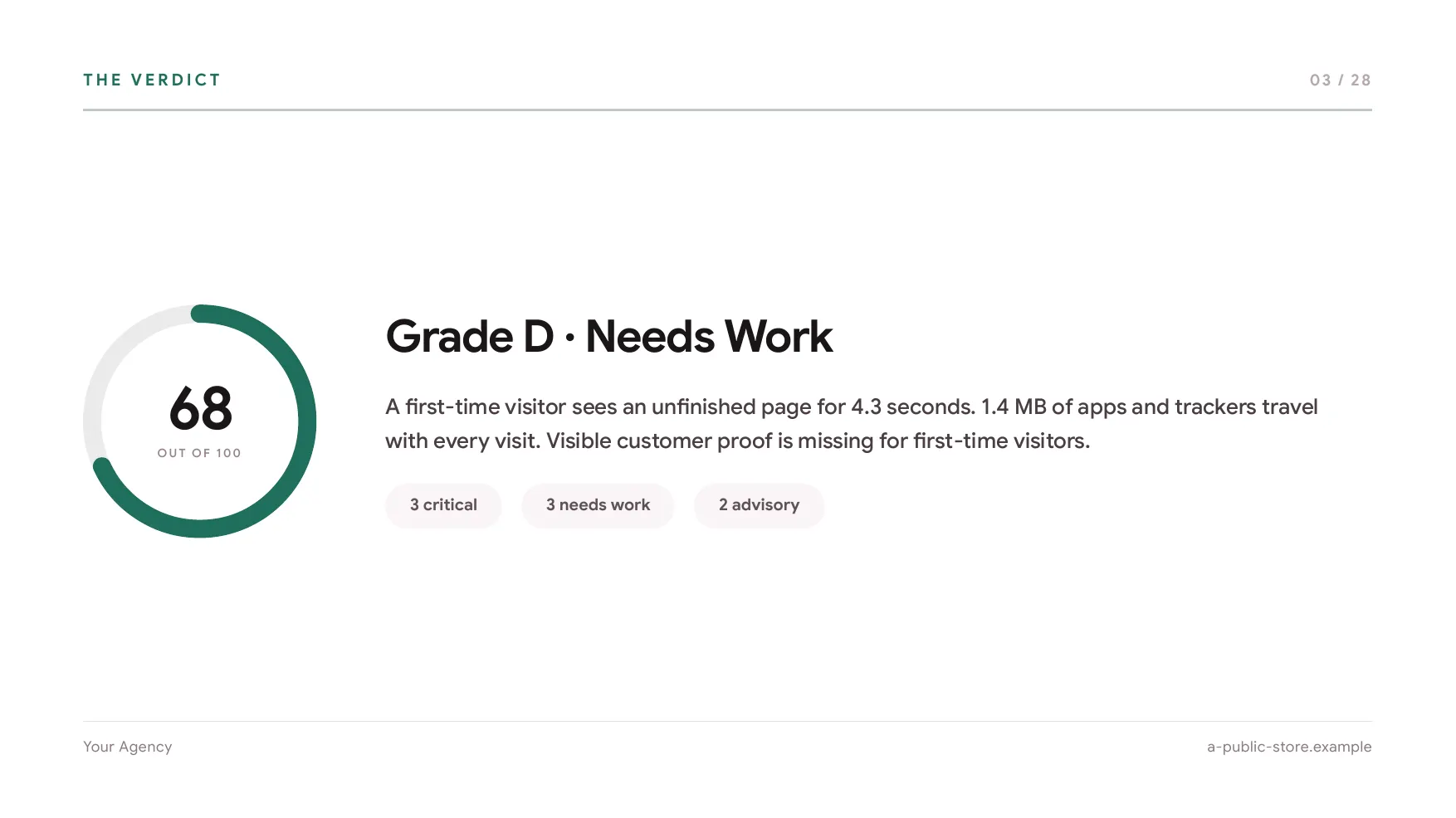
A deck slide headed The verdict: a score dial reading 68 out of 100 in the agency's own brand colour, beside the grade and a plain-language summary.
Opens on your brand
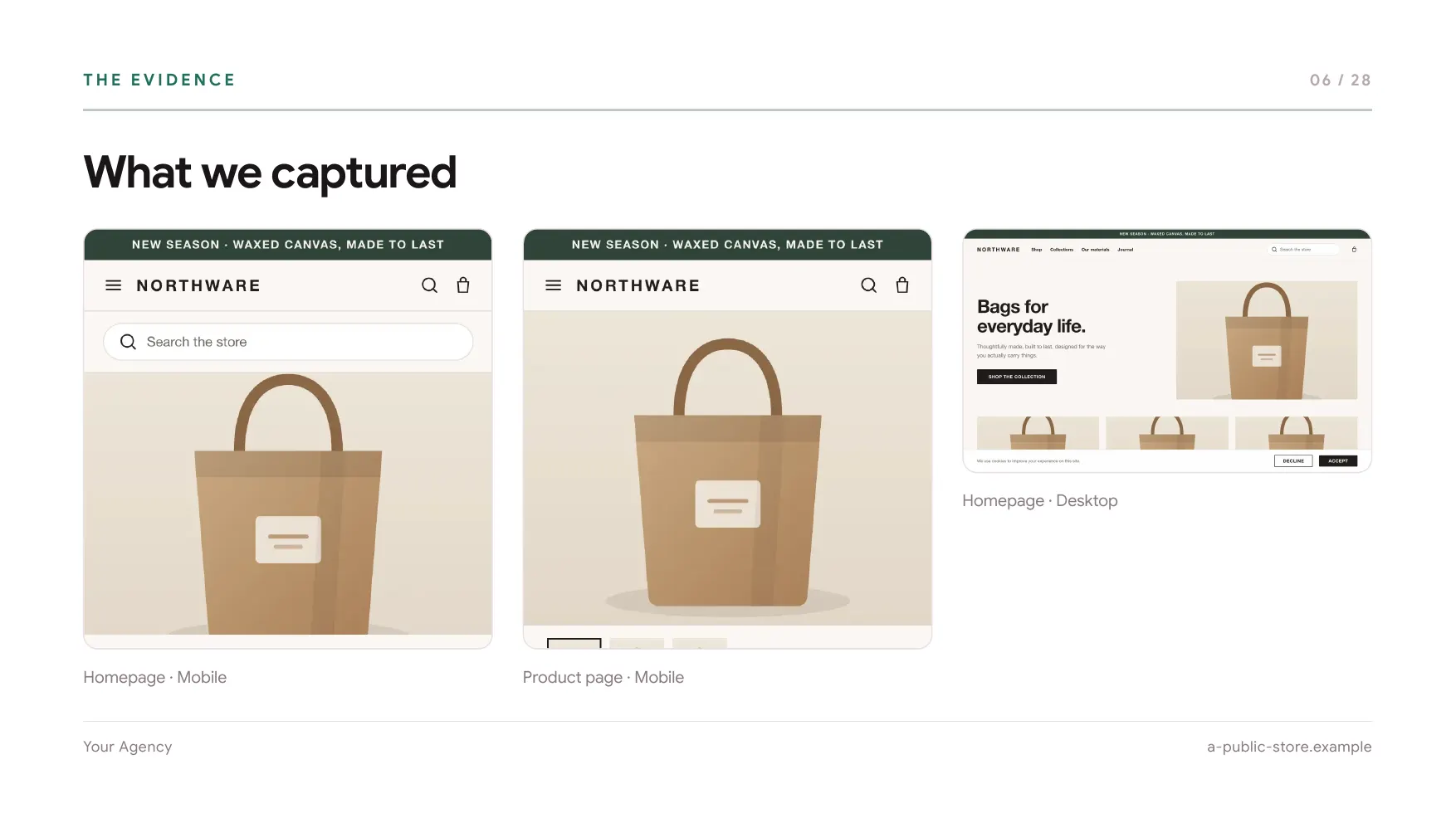
A deck slide headed What we captured, showing the audited storefront's mobile homepage, mobile product page and desktop homepage side by side.
Carries the evidence
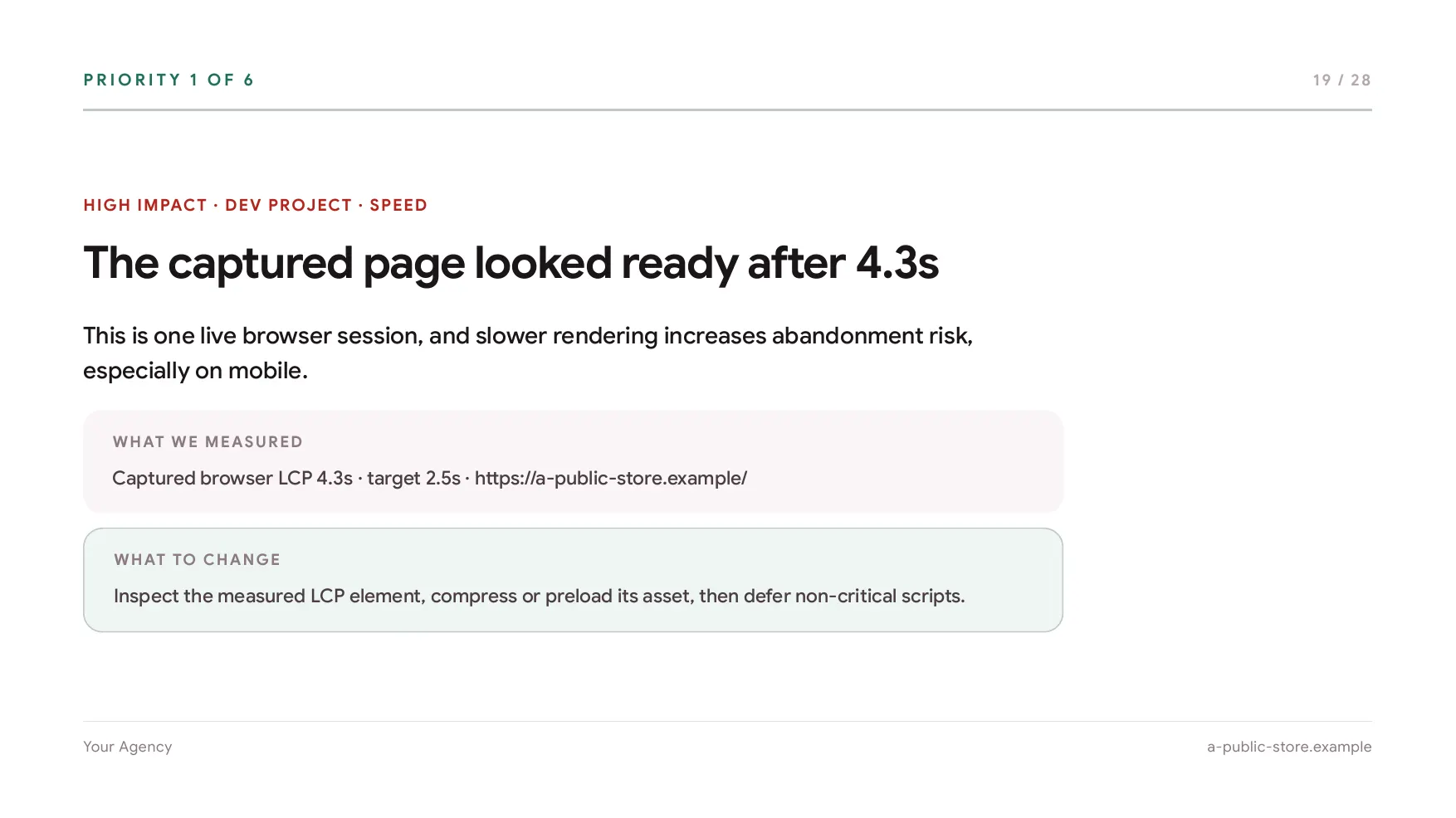
A deck slide headed Priority 1 of 6, naming what was measured and what to change about it.
One slide per priority

Three slides from the deck the sample report on this site produces, rendered by the same code that builds a real one. The agency name and colour are placeholders for yours; the storefront is invented.

The workspace

Three seats, one allowance

Agency is built around a team drawing on a shared pool rather than three people each guarding a private quota.

01 Shared monthly pool 50 report generations a month across all three seats. Nobody has to ask who has budget left, and a seat that is busy this week simply uses more of it.
02 Client folders Group every report for an account together, so a twelve-month history is one click rather than a search.
03 Report tags Label reports by engagement type, stage or owner, and filter the library by them.
04 Synced client data Scores, issues, notes, stages and history sync to the seats on the workspace. Individual plans keep their library in the browser instead.
05 Weekly monitoring Put a client store on a seven-day PageSpeed watch. ShopGrade keeps the previous score beside the latest one and emails you when it drops five points or more. It costs no report generation, so a whole client list can sit on it.
06 The audit recipe A focus (balanced, speed, SEO or conversion) and a grading strictness on every plan, plus your own target score and target LCP on Pro and Agency. Whichever profile produced a report is printed in its methodology chapter, so a client can see the conditions behind the grade.
07 Report retention Every report stays in your account until you delete it. Sharing is what has a clock on it: a public link opens the report to anyone holding it for 15 days, twice per report.
The numbers

What it costs to run an audit

Plain arithmetic on the published price. No projected returns, because we cannot see your rates or your close rate.

01 Agency $69.99 a month for 50 report generations, which is about $1.40 a report if you use the full allowance. Roughly 20 percent less billed yearly.
02 Pro $25.99 a month for 25 generations, one person, with the same white-label and export. The right plan until you need a second seat.
03 What uses a generation One report on one store. A rescan is a fresh report, so it uses one too. Live scores on the toolbar are unlimited and never count against the pool.
04 Running out Report credits top up any plan at 2 generations for $19, used automatically once the monthly pool is gone. They never expire and are non-refundable.
05 Changing plans Upgrade, downgrade or cancel from your account. Paddle prorates plan changes; a cancellation runs to the end of the period you already paid for.
FAQ

What agencies
ask first.

The questions that come up before the first audit.

Something not covered? Email us and a person will answer.
Contact us
Can I audit a store I have no relationship with?
Yes, and that is the point of it. ShopGrade reads the public storefront the same way any visitor's browser does, so a prospect audit needs nothing from the prospect. You remain responsible for using the report lawfully and for respecting each store's terms and rights.
Will the client see that ShopGrade made it?
Not on Pro or Agency. Your logo, brand colour, agency name, prepared-by line, call to action and bio replace ours throughout, and there is no watermark. Credit-funded reports keep a small ShopGrade watermark, and Free reports cannot be shared at all.
Do all three seats share the same 50 reports?
Yes. Agency is one pool of 50 generations a month across the workspace rather than a per-seat quota, so a seat running a heavy week simply draws more of it. Credits top the pool up when it runs out.
What happens when three seats is not enough?
There is no larger tier today. If you need more than three seats or more than 50 generations a month, email us and say what you need. That is genuinely how the next plan gets designed.
How long does a report last?
The report itself stays in your account until you delete it, and you can open it any time from the dashboard. A public link is the part that expires: it opens the report to anyone holding it for 15 days and then the report goes back to private, so an old link cannot be forwarded later to someone who should not have it. Each report can be made public twice.
How long does one audit take?
The live score appears as soon as the storefront loads. A full report usually takes a few minutes, and the exact time depends on the storefront, your connection and whether your plan includes the AI review.
Is the AI going to say something wrong to my client?
It can, and the report says so. The measurements, storefront checks and crawl checks are deterministic. The visual review and implementation brief are AI-assisted and labelled as such, and suggested code is meant to be reviewed in a staging theme before it ships. Read the report before you send it.
Can I audit a password-protected store?
No. ShopGrade needs to confirm Shopify from public domain, asset and theme markers, so a password-protected or otherwise blocked storefront cannot be audited.
Your first report is free

Audit a prospect before the call

Install ShopGrade, open a storefront you want to win, and see what the report gives you to open with.

No Shopify login or admin access required